
How to Build an AI-Native Company in 2027: A Complete Guide
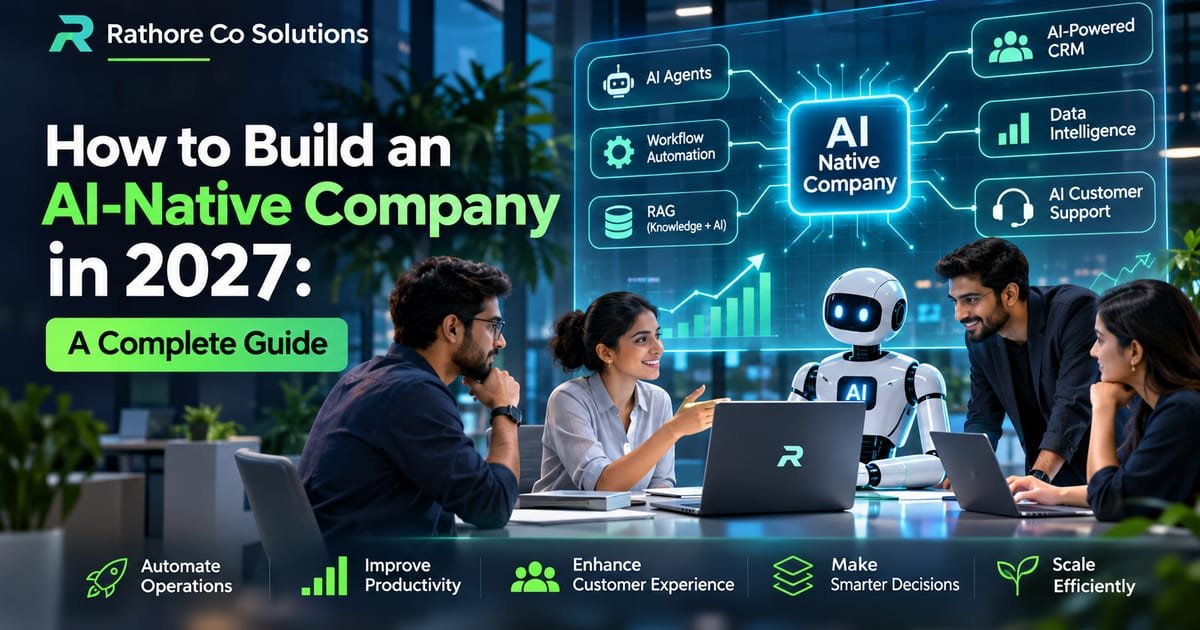
What an AI-native company is, the seven components it is built from — AI agents, RAG, workflow automation, an AI-powered CRM, connected data, analytics and human approval — the technology stack, five use cases, what drives the cost, and a seven-step plan to start.
Businesses are entering a new era where artificial intelligence is no longer just a tool for experimentation. It is becoming a fundamental part of how companies operate, make decisions, serve customers, and grow.
From automated customer support to AI-powered sales systems, businesses are finding new ways to reduce manual work and improve operational efficiency.
But there is a bigger opportunity beyond simply adding AI tools to existing business processes: building an AI-native company.
An AI-native company is designed around artificial intelligence from the beginning. Instead of treating AI as an additional feature, it integrates AI into its workflows, products, decision-making, and daily operations.
In this guide, we will explore what an AI-native company is, how it works, the technologies required, practical business use cases, and how you can start building one in 2027.
1. What Is an AI-Native Company?
An AI-native company is a business that integrates artificial intelligence into its core operations, products, services, and decision-making processes.
Traditional businesses typically depend on employees performing repetitive tasks using separate software systems. AI-native companies redesign these processes using intelligent automation, AI agents, connected data, and custom software.
For example:
- A traditional company manually assigns incoming leads to sales representatives.
- An AI-native company automatically analyzes leads, identifies their requirements, assigns priorities, and recommends the next action.
The difference is not simply using AI. It is redesigning how the entire business operates.
An AI-native company doesn't just use AI to work faster. It builds its business model around working smarter.
For the benefits, and ten business models that can be rebuilt this way, see AI-Native Company: Benefits, Top 10 Business Ideas & The Future of Business.
2. Traditional Business vs AI-Native Business
The biggest difference is how work gets done.
| Business Function | Traditional Company | AI-Native Company |
|---|---|---|
| Customer Support | Manual responses | AI-assisted support agents |
| Sales | Manual lead follow-ups | Intelligent lead qualification |
| Marketing | Manual campaign planning | AI-assisted campaign execution |
| Operations | Repetitive manual tasks | Automated workflows |
| Reporting | Manually prepared reports | AI-powered analytics |
| Data Management | Separate systems | Connected business intelligence |
| Decision Making | Historical reports | Data-driven recommendations |
An AI-native company still needs people. Human expertise, creativity, relationships, and strategic decisions remain important.
The goal is to let AI handle suitable repetitive and information-heavy tasks so people can focus on higher-value work.
3. Why Businesses Are Moving Towards AI-Native Models
AI is changing how businesses compete. Companies that successfully integrate AI into their operations can potentially improve productivity, customer experience, and scalability.
Here are five major reasons businesses are adopting AI-native approaches.
3.1 Reduce Repetitive Work
Many businesses spend hours on data entry, report preparation, lead management, email responses, and administrative tasks.
AI and automation can streamline suitable repetitive activities and reduce unnecessary manual effort.
3.2 Improve Customer Experience
AI-powered customer support can help customers find information, receive product recommendations, and get assistance outside normal business hours.
Human employees can handle complex issues requiring judgment or personal attention.
3.3 Make Better Business Decisions
AI can analyze business data, identify patterns, highlight unusual changes, and provide recommendations.
For example, a retail business can use AI to analyze sales trends and identify products that may require restocking.
3.4 Scale Without Increasing Complexity
As a business grows, its operational workload also increases.
Connected automation and AI agents can help businesses handle larger workloads without increasing manual effort at the same rate.
3.5 Build Better Digital Products
AI-native thinking also creates opportunities to develop smarter SaaS platforms, CRM systems, ERP solutions, customer portals, and industry-specific software.
4. Seven Core Components of an AI-Native Company
Building an AI-native company requires more than subscribing to AI applications. It requires a connected technology ecosystem.
4.1 AI Agents
AI agents are software systems that can understand instructions, reason through tasks, interact with approved tools, and perform multi-step workflows.
For example, an AI sales agent could:
- Receive a new customer inquiry.
- Analyze the customer's requirements.
- Check product information and availability.
- Recommend relevant products.
- Prepare a personalized response.
- Update the CRM.
- Notify the sales team when human intervention is required.
AI agents are particularly useful when tasks involve multiple steps and systems.
4.2 Retrieval-Augmented Generation (RAG)
RAG allows AI applications to retrieve relevant information from external knowledge sources before generating responses.
Businesses can connect AI systems to:
- Company documents
- Product catalogs
- Internal policies
- Technical documentation
- Customer support knowledge bases
- Historical business records
For example, an AI support assistant can retrieve the correct product manual and answer a customer's question using company-approved information.
RAG helps make AI responses more relevant to a company's actual knowledge base. It does not guarantee accuracy, so source quality and verification remain important.
4.3 Workflow Automation
Workflow automation connects different applications and executes tasks based on predefined conditions or events.
Examples include:
- Automatically assigning new leads.
- Generating invoices after order confirmation.
- Sending payment reminders.
- Updating inventory after a sale.
- Creating follow-up tasks.
- Notifying managers about important business events.
AI can make these workflows more intelligent by interpreting unstructured information and recommending actions.
4.4 AI-Powered CRM
A traditional CRM stores customer information and tracks interactions.
An AI-powered CRM can go further by:
- Summarizing customer conversations.
- Identifying high-priority leads.
- Recommending follow-up actions.
- Predicting potential sales opportunities.
- Generating personalized communication.
The objective is to transform CRM from a record-keeping system into an intelligent sales assistant.
4.5 Connected Business Data
AI is only as useful as the information it can access.
If customer information, sales records, inventory, and financial data are disconnected, AI may produce incomplete or inconsistent results.
A strong AI-native architecture needs:
- Centralized data management.
- Reliable APIs and integrations.
- Consistent database relationships.
- Access controls and permissions.
- Data validation and synchronization.
- Monitoring and audit logs.
Connected data is the foundation of reliable AI-powered operations.
4.6 AI-Powered Analytics
Traditional analytics tells businesses what happened.
AI-powered analytics can help identify patterns, investigate unusual results, and generate recommendations.
For example:
A business owner asks:
"Why did our sales decrease this month?"
An AI analytics assistant could examine sales by product, location, sales representative, and customer segment to identify possible reasons.
The results should be grounded in actual business data rather than assumptions.
4.7 Human-in-the-Loop Systems
Not every business decision should be automated.
An effective AI-native company defines which activities AI can perform independently and which require human approval.
For example:
- AI can categorize incoming leads.
- AI can prepare quotations.
- A manager approves exceptional discounts.
- AI can draft customer responses.
- Employees handle sensitive customer complaints.
Human oversight is essential for financial decisions, sensitive information, customer commitments, and high-impact actions.
5. Technology Stack Required to Build an AI-Native Company
The right technology stack depends on the business model, operational requirements, budget, and scalability goals.
Here is an example of a modern AI-native technology stack.
| Layer | Technologies |
|---|---|
| Frontend | React, Next.js, TypeScript |
| UI Framework | Tailwind CSS, shadcn/ui |
| Backend | Node.js, Python, .NET |
| Database | PostgreSQL, MySQL, SQL Server |
| AI Models | OpenAI, Anthropic Claude, Gemini |
| AI Frameworks | LangChain, LlamaIndex |
| Vector Database | pgvector, Pinecone, Qdrant |
| Automation | n8n, APIs, Webhooks |
| Cloud Infrastructure | AWS, Azure, Google Cloud |
| Analytics | Metabase, Power BI, Custom Dashboards |
You do not need every technology in this list.
Start with a reliable application architecture, select the AI model based on your use case, and introduce additional infrastructure when the requirements justify it.
6. Real-World AI-Native Business Use Cases
The best way to understand AI-native businesses is through practical applications.
Use Case 1: AI-Native Sales Operations
A business receives hundreds of inquiries every month.
Instead of manually processing every inquiry, an AI-powered system can:
- Capture leads from websites and messaging platforms.
- Identify customer requirements.
- Categorize leads by business potential.
- Recommend products or services.
- Prepare follow-up messages.
- Update CRM records.
Use Case 2: AI-Native Customer Support
An AI support system can access product documentation, FAQs, and support history to answer common questions.
It can also identify issues that require human assistance and transfer the conversation to the appropriate team.
Use Case 3: AI-Native Inventory Management
An intelligent inventory system can analyze historical sales, current stock, pending orders, and seasonal demand.
It can help businesses:
- Identify low-stock products.
- Estimate future demand.
- Highlight slow-moving inventory.
- Recommend reorder quantities.
- Generate stock reports.
Use Case 4: AI-Native Marketing
AI can support the entire marketing workflow:
- Keyword research.
- Content planning.
- Blog and social media drafts.
- Campaign analysis.
- Customer segmentation.
- Performance reporting.
Human review remains important for brand voice, factual accuracy, and creative direction.
Use Case 5: AI-Native Business Intelligence
Business owners can interact with their business data using natural language.
For example:
"Show me the top-performing products this quarter."
"Which sales representatives have the highest conversion rates?"
"Which cities generated the most revenue?"
An AI analytics layer can translate these questions into data queries and present the results, subject to appropriate access controls and validation.
7. How Much Does It Cost to Build an AI-Native Company?
The cost depends on whether you are implementing individual AI workflows or developing a complete AI-powered business ecosystem.
| Implementation | Typical Scope |
|---|---|
| Basic AI Automation | Email, forms, notifications |
| AI Assistant | Company knowledge and customer support |
| AI Business System | CRM, analytics, and workflow integrations |
| AI-Native Platform | Connected business applications and AI agents |
There is no universal fixed price. Costs depend on integrations, data complexity, security, model usage, development effort, and ongoing maintenance.
Businesses should begin with a clearly defined problem and calculate the expected return before expanding their AI infrastructure.
8. Step-by-Step Strategy to Build an AI-Native Company
You do not need to transform your entire organization overnight.
Follow this practical implementation strategy.
Step 1: Understand Your Business Processes
Identify repetitive activities across sales, marketing, finance, operations, and customer support.
Document how work currently happens and where delays or inefficiencies occur.
Step 2: Identify High-Value AI Opportunities
Choose processes where AI can save meaningful time, improve quality, or increase revenue.
Prioritize opportunities based on business impact, implementation effort, and risk.
Step 3: Organize Your Business Data
Connect relevant systems and establish reliable data structures.
Clean, consistent, and accessible data should come before complex AI automation.
Step 4: Build Your First AI Workflow
Start with one focused use case, such as lead qualification, customer support, or automated reporting.
Avoid building too many disconnected AI agents at the beginning.
Step 5: Integrate AI With Existing Software
Connect your AI systems to your CRM, ERP, website, communication tools, and internal applications through secure APIs and integrations.
Step 6: Establish Security and Human Approval
Define access permissions, approval requirements, audit logs, and data protection policies.
Test AI outputs before allowing systems to perform important business actions.
Step 7: Measure Results and Scale
Track measurable outcomes such as:
- Time saved per task.
- Lead response time.
- Customer satisfaction.
- Operational costs.
- Conversion rates.
- Error rates.
- Revenue generated.
Improve the system based on actual results before expanding to other departments.
9. Common Mistakes to Avoid
Many businesses start using AI without a clear implementation strategy.
Avoid these common mistakes:
1. Buying too many AI tools: Multiple disconnected subscriptions do not create an AI-native company.
2. Ignoring data quality: Poor data can lead to incorrect AI recommendations and unreliable reports.
3. Automating everything: Some tasks require human judgment, approval, and accountability.
4. Ignoring security: Customer data and internal business information must be protected.
5. Building without measurable goals: Every AI implementation should solve a real business problem.
6. Expecting AI to work perfectly: AI systems need testing, monitoring, feedback, and continuous improvement.
10. The Future of AI-Native Companies (2027–2030)
The next phase of business transformation will involve deeper integration between AI agents, enterprise software, business data, and automation platforms.
We can expect more businesses to adopt:
- AI agents for multi-step business workflows.
- Natural-language interfaces for enterprise applications.
- AI-powered industry-specific SaaS platforms.
- Intelligent business analytics.
- Automated software development workflows.
- AI-assisted customer experiences.
- Connected AI ecosystems across departments.
However, successful businesses will not be those that simply adopt the most AI tools.
They will be those that understand their customers, build reliable systems, organize their data, and use AI to solve meaningful business problems.
Conclusion: Build a Business Designed for the AI Era
Becoming an AI-native company is not about replacing every employee or introducing AI into every department.
It is about rethinking how your business works.
Start with your business challenges, connect your data, automate repetitive processes, introduce intelligent AI systems, and continuously measure the results.
Whether you are building a startup, scaling an existing company, or modernizing traditional business operations, the opportunity is to create a business that is more intelligent, connected, and scalable.
The future belongs to businesses that don't just use technology but build their operations around it.
Build Your AI-Native Business With Rathore Co Solutions
At Rathore Co Solutions, we help startups and businesses turn ideas into practical technology solutions.
From custom software development and AI-powered automation to intelligent business applications, we help businesses build systems designed for growth.
Our services include:
- AI Agent Development
- Business Process Automation
- Custom Software Development
- SaaS Product Development
- CRM and ERP Solutions
- AI Integration and Consulting
Have an idea or want to transform your business with AI?
Let's discuss how we can build the right technology for your business. See what we build and what it costs.
Let's Build
incredible work together.
Request a Quote- Call me
- Video call
- Book 1:1 Meeting
- Social